[.NET Core] Web MVC 001 - program.cs

.NET Core 的專案的底層,都是從 Console Program 開始的。就稍微比較一下透過 dotnet cli 所產生的 console program 和 empty web program 的檔案差異。

檔案差異

Program.cs

Console

1
2
3
4
5
6
7
8
9
10
11
12
using System;

namespace study_001
{
class Program
{
static void Main(string[] args)
{
Console.WriteLine("Hello World");
}
}
}

Web

1
2
3
4
5
6
7
8
9
10
11
12
13
14
15
16
17
18
19
using System;
...

namespace study_002
{
public class Program
{
public static void Main(string[] args)
{
BuildWebHost(args).Run();
}

public static IWebHost BuildWebHost(string[] args) =>
WebHost.CreateDefaultBuilder(args)
.UseStartup<Startup>()
.Build();
}
}

差異

Console 與 Web 專案架構基本上是一樣的,唯一有差異的是,Web 專案需要跑 WebHost Builder 來建立網站。

.csproj

Console

1
2
3
4
5
6
<Project Sdk="Microsoft.NET.Sdk">
<PropertyGroup>
<OutputType>Exe</OutputType>
<TargetFramework>netcoreapp2.0</TargetFramework>
</PropertyGroup>
</Project>

Web

1
2
3
4
5
6
7
8
9
10
11
12
13
14
15
16
<Project Sdk="Microsoft.NET.Sdk.Web">

<PropertyGroup>
<TargetFramework>netcoreapp2.0</TargetFramework>
<UserSecretsId>aspnet-study_002-741020AF-3B35-4E03-A07A-E2EFF47D6CCA</UserSecretsId>
</PropertyGroup>

<ItemGroup>
<Folder Include="wwwroot\" />
</ItemGroup>

<ItemGroup>
<PackageReference Include="Microsoft.AspNetCore.All" Version="2.0.0-preview1-final" />
</ItemGroup>

</Project>

差異

web 專案多包含了一個 wwwroot 資料夾,及 Microsoft.AspNetCore.All 的 package。

建立WebHost

WebHost

透過 WebHost.CreateDefaultBuilder 建立一個 Microsoft.AspNetCore.Hosting.IWebHost 並在 Main 下執行

CreateDefaultBuilder

執行CreateDefaultBuilder(args) 時, WebHostBuilder 會有以下的預設值

  1. 使用 Kestrel 為網站伺服器
  2. 跟目錄為目前所在的資料夾位置
  3. 預設載入 appsetting.json 及 appsettings.[environment].json 設定檔
  4. 如果是開發模式時,會載入 User Secrets
  5. 使用環境變數 (environment variables)
  6. 接受從命令列傳入的參數
  7. 當做 logging 時,會輸出到 console 跟 debug output
  8. 開啟 IISIntegration
  9. 如果是開發模式,新增例外狀況頁面

UseStartup

UseStartUp 是 IWebHostBuilder 的擴充功能,接受一個 AssemblyName 並使用 IWebHostBuilder 內部的 UseSetting 的方法新增或更新 _config 裡鍵值為WebHostDefaults.ApplicationKey 與 WebHostDefaults.StartupAssemblyKey 下,_config為一個 IConfiguration 物件。建立程式碼如下,僅供參考使用

1
2
3
4
5
6
7
8
9
10
11
12
private IConfiguration _config;

_config = new ConfigurationBuilder()
.AddEnvironmentVariables(prefix: "ASPNETCORE_")
.Build();

...
public IWebHostBuilder UseSetting(string key, string value)
{
_config[key] = value;
return this;
}

build

建立 WebHost 物件

Startup

Startup 用來設定網站會使用到的 service,參數、middleware 等。基本上都在這支程式內搞定

ConfigureServices

設定有哪些服務可以使用

1
2
3
4
5
6
7
8
9
10
11
12
13
14
15
16
public void ConfigureServices(IServiceCollection services)
{
// Add framework services.
services.AddDbContext<ApplicationDbContext>(options =>
options.UseSqlServer(Configuration.GetConnectionString("DefaultConnection")));

services.AddIdentity<ApplicationUser, IdentityRole>()
.AddEntityFrameworkStores<ApplicationDbContext>()
.AddDefaultTokenProviders();

services.AddMvc();

// Add application services.
services.AddTransient<IEmailSender, AuthMessageSender>();
services.AddTransient<ISmsSender, AuthMessageSender>();
}
  1. ConfigureServices不一定要存在,如果有,他會在 Configure前被執行
  2. 如果要設定 Configuration options,需要在此設定
  3. 使用的服務需要設定時,可透過IServiceCollection的 Add[Service] 的方式註冊
    1. 如上述範例為註冊 Entity Framework、Identity、MVC
  4. DI 也會在 ConfigureServices裡設定

Configure

設定使用哪些服務

1
2
3
4
5
6
7
8
9
10
11
12
13
14
15
16
17
18
19
20
21
22
23
24
25
26
27
public void Configure(IApplicationBuilder app, IHostingEnvironment env, ILoggerFactory loggerFactory)
{
loggerFactory.AddConsole(Configuration.GetSection("Logging"));
loggerFactory.AddDebug();

if (env.IsDevelopment())
{
app.UseDeveloperExceptionPage();
app.UseDatabaseErrorPage();
app.UseBrowserLink();
}
else
{
app.UseExceptionHandler("/Home/Error");
}

app.UseStaticFiles();

app.UseIdentity();

app.UseMvc(routes =>
{
routes.MapRoute(
name: "default",
template: "{controller=Home}/{action=Index}/{id?}");
});
}
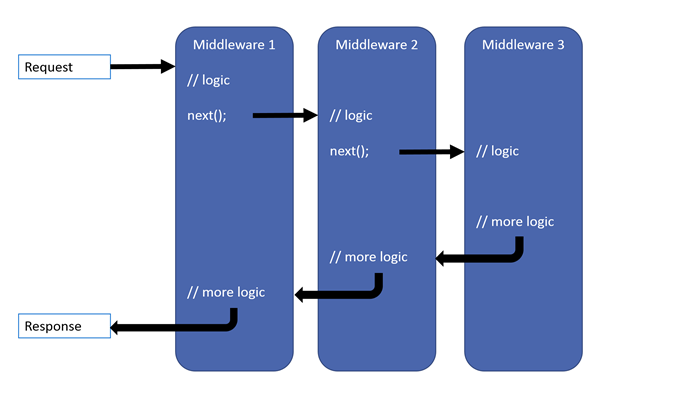
  1. Congiure 是用來設定 ASP.NET 應用程式會對請求,透過 middleware 組合的方式,做出一系列的動作與回應。
  2. middleware 物件使用 Use 的方法,將物件家到在 IApplicationBuilder 上

初始服務

在一開始就有一些初始服務的存在,分別為

  • constructor: IHostingEnvironment,ILoggerFactory
  • ConfigureServices: IServiceCollecton
  • Configure: IApplicationBuilder、IHostingEnvironment、ILoggerFactory、IApplicationLifetime

Empty Web Template 的 startup.cs

1
2
3
4
5
6
7
8
9
10
11
12
13
14
15
16
17
18
19
public class Startup
{
public void ConfigureServices(IServiceCollection services)
{
}

public void Configure(IApplicationBuilder app, IHostingEnvironment env)
{
if (env.IsDevelopment())
{
app.UseDeveloperExceptionPage();
}

app.Run(async (context) =>
{
await context.Response.WriteAsync("Hello World!");
});
}
}

在初始的專案範本裡,只有在 Configure 的地方寫了兩個功能

  1. 注入 IApplicationHilder 與 IHostingEnvironment 兩個服務
  2. 判斷如在開發模式下,新增顯示開發者例外狀況頁面功能
  3. 回傳 「Hello World!」 的文字給畫面顯示

回顧

  • Web 應用程式也是 Console 程式
  • 使用 IWebHostBuilder 的方式建立一個 WebHost 並將其執行起來,就可將 Console 程式變成一個網頁伺服器
  • 可透過 Startup.cs 的方式設定 WebHost
  • 所有的 Dependency Injection 需要在 Startup.cs 檔案內的 ConfigureServices 方法做註冊動作
  • .NET Core Web 是使用 middleware 的方式來設定網站會如何對連線請求做回應
  • 在 Configure 方法內做 middleware 的順序及相關功能設定

參考資料